
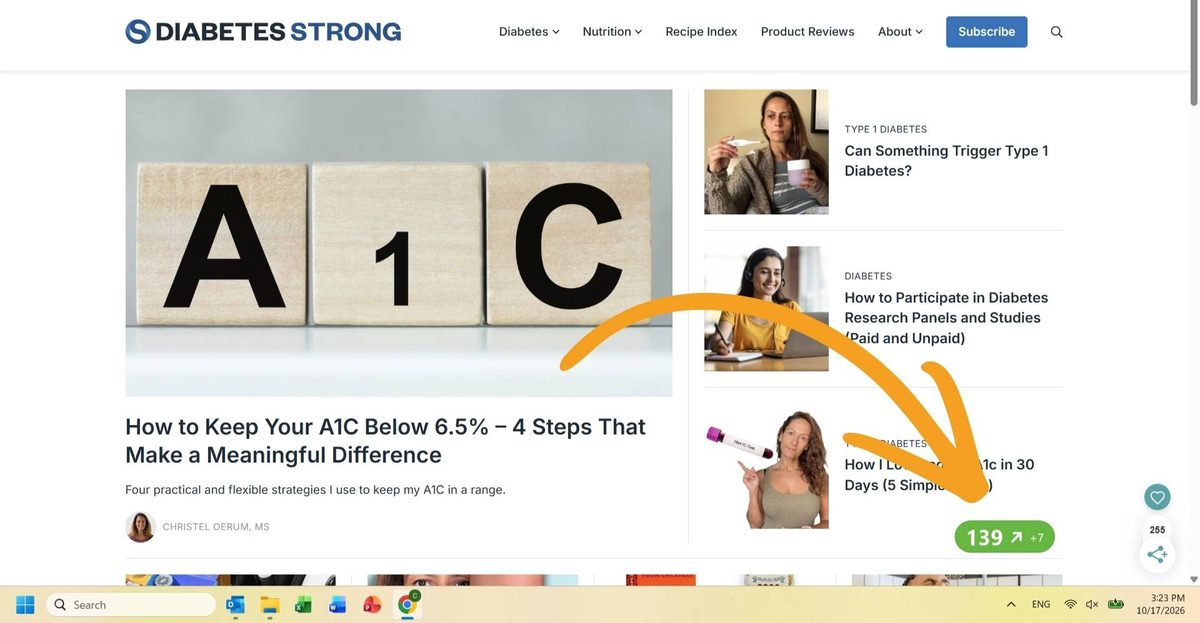
As I sit here and write, I can see my blood sugar reading on my laptop. I don’t have to pick up my phone or look at my watch. My glucose number and trend are right there in my browser while I work.
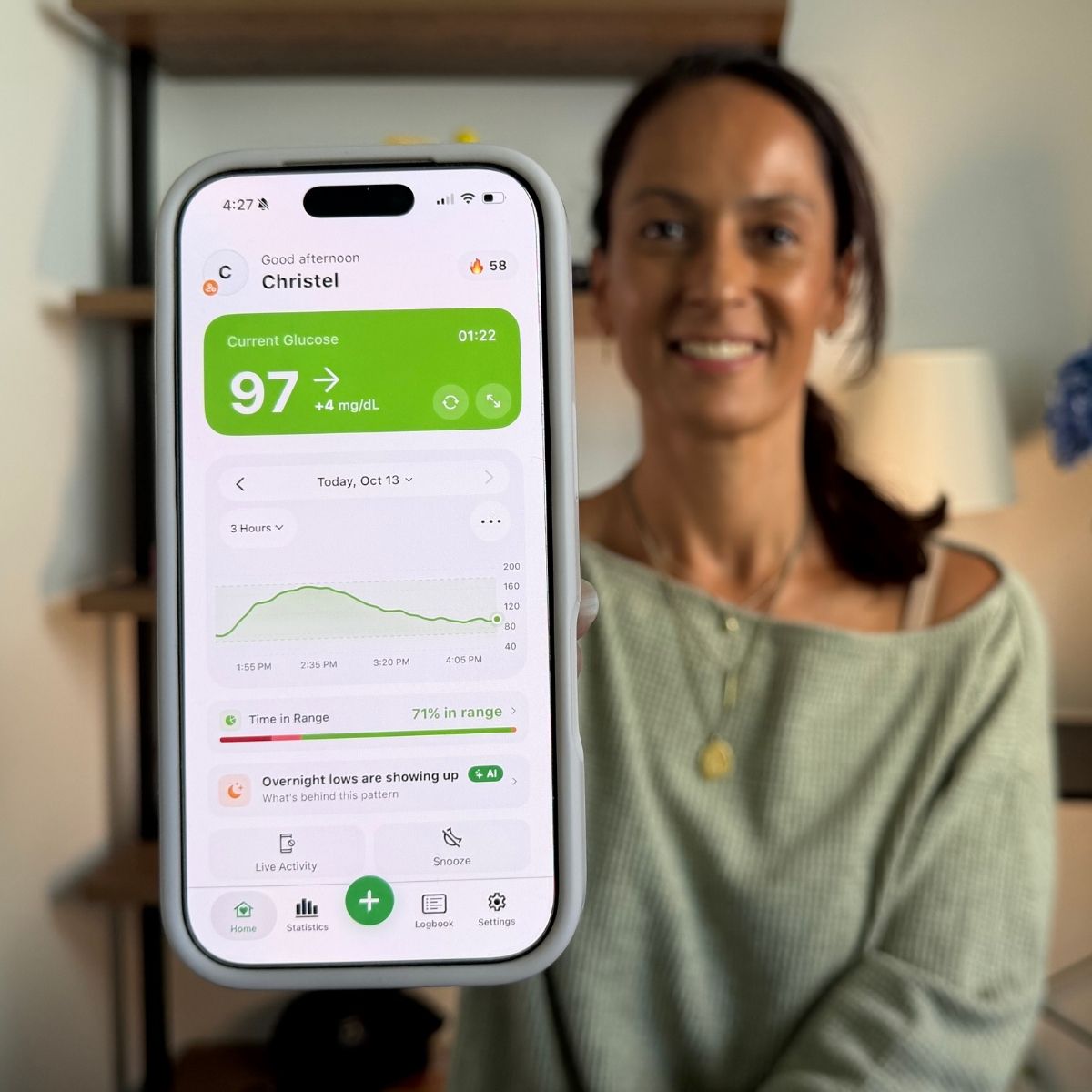
The app making that possible is Sugar Sense, a companion app for continuous glucose monitors (CGMs).
I’ve had it downloaded since August 2026, and after using it alongside my Dexcom G7, I’ve found several genuinely useful features.
Sugar Sense doesn’t replace your CGM or its official app. Instead, it takes the glucose data your sensor already produces and gives you more ways to view it, customize alerts, and analyze your glucose patterns.
Access to the Sugar Sense Premium was gifted, and the review is sponsored by Sugar Sense. Views and opinions are my own.
What is Sugar Sense?
Sugar Sense is an independent CGM companion app. It works with FreeStyle Libre 2 and 3 through LibreLinkUp, Dexcom G6 and G7 through Dexcom Share, and any Nightscout site. Dexcom ONE is not supported.
The easiest way to explain Sugar Sense is that it sits on top of the CGM system you already use. Your Dexcom or Libre sensor still does the measuring, and you should still rely on the manufacturer’s app for treatment decisions and primary safety alerts.
Sugar Sense takes that existing data and makes it available in more places, while adding its own alerts, statistics, sharing, and optional AI tools.
And Sugar Sense isn’t only a glucose display. You can log meals, insulin, medications, and other diabetes-related information in the app.
If you use Apple Health, meals and insulin logged in Sugar Sense can also be sent back to Apple Health. Health Connect integration is available on Android.
What does Sugar Sense do that my CGM app doesn’t?
This was my main question when I started testing Sugar Sense. If you use a CGM, you already have an app that gives you real-time glucose readings, alerts, trend information, and other useful features. So why would you need another app?
For me, the biggest difference is access. Sugar Sense can put my glucose number on far more screens and devices than my regular CGM app can.
Sugar Sense can show glucose on:
- iPhone and Android phones
- Home and lock screen widgets
- Live Activity and Dynamic Island
- Apple Watch and Wear OS
- Garmin watches
- CarPlay (through Live Activity)
- Android Auto
- Web dashboard
- Browser extensions for Chrome, Edge, Firefox, and Safari
- The Mac menu bar
- The Windows system tray
- Alexa.
Not everyone needs their blood sugar on that many screens. But I’ve been surprised by how much I like having it available where I’m already looking.
How I use Sugar Sense
My glucose in my browser
The feature I probably notice most is also one of the simplest. That’s why I started this review by talking about seeing my blood sugar on my laptop.
While I’m working, I can see my glucose reading and trend in my Chrome browser. I don’t have to reach for my phone to check where my blood sugar is going, which means fewer distractions.
The AI food scanner
I also use the AI food scanner. You take a picture of your food, and Sugar Sense estimates the carbohydrate content and meal composition.
I don’t use the carb count, and Sugar Sense says its AI features shouldn’t be used to make insulin-dosing decisions.
I do use the meal composition overview and the AI’s blood sugar impact estimate. I find that useful as an extra piece of information when I’m figuring out my insulin dosing, particularly when I’m about to eat a meal where the potential blood sugar impact isn’t obvious.
You get three free scans to assess if that feature is for you, after which the food scanner requires a Premium subscription.
AI Insights and my Morning Report
Another feature I check is the Insights tab. Sugar Sense looks for patterns in my glucose data and, with Premium, provides an AI-generated summary.
It’s a bit like having my own little diabetes coach. It spots patterns and gives me pointers on where to focus or what to bring up with my doctor.
For example, repeated overnight lows are much more useful to me as a pattern than as a collection of individual low alerts. That’s the kind of information I can use to decide what I want to look at more closely or discuss with my healthcare provider.
I also get a Morning Report after a night of data. It gives me a quick overview of how my blood sugars did overnight and can make recurring patterns easier to spot.
Who is Sugar Sense for?
I think Sugar Sense makes the most sense if you already like your CGM but want more from the software.
It could be particularly useful if you spend a lot of time at a computer and want to see your glucose without checking your phone; want more control over alerts; have a partner, parent, or caregiver who follows your glucose; or want to see it on more/different devices.
I don’t personally use all of these, but depending on the devices you already use, some could be genuinely useful. I don’t own a car, but I plan to try CarPlay the next time I rent one. Being able to glance at my glucose without handling my phone makes a lot of sense while driving.
Another interesting advantage is that Sugar Sense is independent. It isn’t owned by Dexcom or Abbott, and it can support competing sensors side by side. That could be useful if you switch CGM brands or if different people in a family use different systems.
Other Sugar Sense features worth knowing about
I think the Care Circle could be one of the most useful Sugar Sense features for families, partners, and caregivers.
You can invite people to follow your glucose, and following is free. Followers can see your glucose information and receive urgent alerts for very low or very high glucose, predicted lows, and missed readings, but not routine low and high alerts. They can customize the sounds, priority, and repeat settings for these alerts, so the person following you doesn’t necessarily get the exact same notifications as you.
Of course, Dexcom and Libre already have their own follower solutions. The difference here is that Care Circle brings the Sugar Sense alert experience to the follower as well, and it works across the CGM brands Sugar Sense supports.
Premium also adds Call for Low. You choose a glucose threshold between 50 and 70 mg/dL. When a fresh reading reaches it, Sugar Sense can call your phone up to three times. Pressing 1 confirms you’re okay. If you don’t answer, it calls your chosen emergency contact.
This is not an emergency-response service, and it does not call 911. Like the rest of Sugar Sense, it depends on internet connectivity and third-party services, so it should never be your only safety net.
More customizable glucose alerts
And then there are the Sugar Sense alerts. I was curious to try those out as my CGM already has pretty excellent alerts. But Sugar Sense does add another layer of control over how you want different situations communicated to you.
Sugar Sense also gives you more control over glucose alerts, including thresholds, sounds, and repeat behavior. Version 2.5 of the Sugar Sense iPhone app introduced Quiet Hours, allowing you to soften or pause alerts during selected days and times, with normal alerts automatically resuming afterward. It also has a predictive low alert, but as a Dexcom G7 user, this isn’t a major selling point for me since Dexcom already has Urgent Low Soon.
One feature I do appreciate is how Sugar Sense handles stale data. If a reading is more than 15 minutes old, it shows “No Data” rather than displaying an old number as though it were current.
What is free and what does Sugar Sense Premium add?
I appreciate that Sugar Sense’s pricing structure makes the core monitoring and safety features free.
| Free | Premium |
| Live glucose monitoring & alerts | AI food scanner after 3 free scans |
| Care Circle following | AI Insights |
| Morning Report | Call for Low |
| Computer & browser access | Apple Watch, Wear OS & Garmin |
| Apple Health & Health Connect | Widgets, Live Activity & Dynamic Island |
| Alexa | CarPlay |
| 2 medication reminders | Unlimited medication reminders & PDF reports |
You can try a free trial to test the Premium features before deciding whether they add enough value for you.
What Sugar Sense does NOT do
Sugar Sense does not measure your glucose. You still need a supported CGM, or you have to enter glucose manually.
It also does not replace the official Dexcom or Libre app, and it is not intended for insulin dosing or other treatment decisions. Because Dexcom data comes through Dexcom Share and Libre data through LibreLinkUp, Sugar Sense also depends on those services, your internet connection, and notification systems to keep data flowing.
That means readings or alerts can be delayed or fail. This is one reason I would keep the official CGM app and its safety alerts running even if I use Sugar Sense every day.
My verdict after using Sugar Sense
My question going into this review was simple: I already have the Dexcom G7 app, so does Sugar Sense actually give me anything useful enough to justify another diabetes app on my phone?
For me, yes.
It isn’t because Sugar Sense replaces anything Dexcom does. It doesn’t. The value is that it takes the glucose data I already have and makes it easier to access and, in some cases, easier to interpret.
The browser extension is the clearest example. Seeing my glucose while I work, even in a coffee shop, sounds small, but I use it constantly. I also like the way the app surfaces patterns through the Morning Report and Insights.
I don’t think everyone needs Sugar Sense. If you’re completely happy with your CGM manufacturer’s app, rarely look at your glucose anywhere other than your phone, and don’t want additional analytics or sharing tools, there may not be enough here to change how you manage your diabetes.
But if you’ve ever wished your CGM data could follow you beyond the official app, onto your computer, watch, lock screen, car, or your family’s devices, that is where Sugar Sense becomes interesting.
For me, that’s the real selling point: it doesn’t give me new glucose data. It gives me more useful ways to interact with the glucose data I already have.
You can download Sugar Sense here.